Ebees Solutions - Website design
UX/UI, Research, Web
Design a website for a company providing Agile training.

Project Overview
Ebees Solutions is a startup company focusing on providing agile training for individuals and companies. The task is to work with the company and create an easy-to-use website which will attract individuals of all backgrounds and encourage them to join the programme.
Roles
UX Designer, UI Designer, Researcher
Tools
Figma, Flowmapp
(Use spacebar when filling in details for prototype)

1.0 Understanding Requirements
It is important to first identify what the problem is and what are the objectives of the study. In this stage we can identify what metrics will determine a successful project completion.
1.1 Problem Statement
There are concerns of usability and the aim is to improve the functionality and user ability. Ebees Solutions had no website which reduced their likelihood to attract customers and the current website is not complete and may drive potential users away due to the incomplete functionality of it.
-
Not a functional website
-
No way for potential users to sign up

1.2 Objectives
Increase usability of their website and create an experience that is visually appealing and helps increase conversions and product sales.
1.3 Current Style Guide
Analysing the current style guide enables greater transparency and organisation of elements on the current website.
.jpg)

1.4 Current Site Map
Here I would like to clarify the website’s goals by mapping out the pages and ensure that every element will help reinforce our goals mentioned previously.

2.0 Research & Analysis
This is where I can identify users and their needs to design and target appropriately.
2.1 UX Analysis
Firstly, I decided to do my own UX audit on the website, to understand why we are not reaching the objectives given. Below I have analysed the web page:
Visually, I don’t really like how the white background cuts off.

There are 2 tabs/pages in the navigation that is blank - ‘Advance Tools’ and ‘About Us’. I would hide these as they’re blank.
There is a lot of free space which they could take advantage of by giving the user more information about the service and add a footer.
Even though there is a CTA button, it is not very visually appealing and does not stand out, therefore may not be as effective as intriguing users.
These images are very old school, which makes this website look very outdated and wouldn’t entice users to sign up to the service. I also expected these images to be linked to another page but they are static.

Buttons are different for each page - very inconsistent.
These buttons are also dead ends as they are not linked to anything.
Inconsistent text sizing throughout the website. Title and paragraph should align for ease of read to allow the eyes to naturally flow.
They have used stock images for the other two sections but they decided to not use images for the bottom three section. It looks very untidy and not visually appealing.
The orange buttons are very inconsistent in sizing. When clicked, it automatically opens a new email so users can contact the company.
This is left blank but is linked to their email like the other orange buttons - what is the offer here?

A different component and also another version of a button.
2.2 Mood board
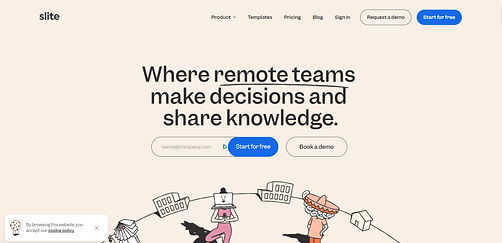
Secondly, I wanted to create a mood board to visually see the different components of websites that I find appealing and may find useful or necessary to include in the design.


2.3 Competitive Analysis
The next step is to carry out a UX analysis of other websites that offer similar products and identify the strengths and weaknesses.


1- The Landing Page has CTA button in the middle which will draw user attention.
2- It appears as a primary navigation button, however it is smaller as it is a smaller font than the secondary navigation tabs.
3- Similar style icons, cartoon like throughout with distinct colour palette
4- The menu label is in view when the dropdown is open which reminds users what they are choosing. However, the user can not travel to the actual category as there is no link to the actual page of “About Us” from which they could travel and explore the sub-navigations.
5- Logo leads to home page which is useful and natural for some users, however, less technical users may not find it easy and natural to assume the logo leads to home page. Thus in addition to the clickable logo there should also be a clear “Home” tab.

6- Showing biggest clients may help users trust more and sign up
7- Different button format to the rest of the website which is not appealing and too long of a text which may have been more impactful if it just said “see reviews”.
8- New navigations that were not shown at the top of the website and can be a little confusing. Would be a better idea to have links showing the tabs that are at the top.
9- Good UX to have a button to entice user to use, however, a button to go straight to training schedule would be more appropriate as it is identified as primary navigation.
10- There is no highlighted tab to know what page you are currently on.
11- It is very unnoticeable and even though it is a good idea to have a home button, and a way to go back to “training”, it is more user friendly to have it more noticeable and perhaps in the same pathway as the menu tabs.
12- Relevant illustrations of same format to home page illustrations. Keeps the flow of the website.

1- Good primary navigation button with clear incentive to attract users to get the product
2- not a necessary illustration with a lot of info that is looked over easily
3- Statistics for courses are helpful to make the product offered seem trustworthy
4- Easy to follow illustrations, clean aesthetic
Other notes:
Same colour scheme throughout
2.4 User Research
I conducted user research through usability testing observation and a small survey.
Goals

Effortless Tasks
To see if users can complete tasks on the website hassle free.

User’s Thought Process
The users will be asked to say out loud what they are thinking and I will observe the performance as they explore the website.

Identify problems
Identify and find solutions to the problems the users face while using the website.
Tasks

Understand what the website is, what product they are offering and can easily navigate.

Know what courses are offered and their prices

Easily able to purchase a course
Methodology
All users were informed that the website is currently live and that they should vocalise what they feel when exploring the website.
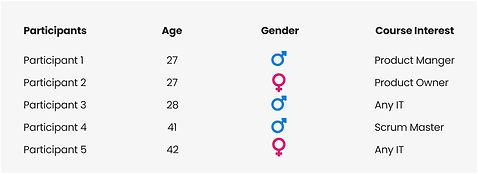
Since the client mentioned that the target audience is mostly 30+, the participants are of close ages and are all interested in online courses.
Post-test briefing and questions will be asked after the session
3 Tasks
To be performed by all participants
User Group
Task Completion Rate

Post-Session Briefing

"I felt like i was back in 2009. I think the stock images were childish and with no purpose. Feels like theres a lot of space that hasn’t been used well. The website needs more information and some of the alignment is weird."
Participant 1
"I like the homepage. I don’t think the space has been used well.It looks unreliable and incomplete. It needs more information and I don’t like the animated text."


Participant 2
"First page looks professional. There really isn’t a lot of info. How do I contact them if I want to?"
Participant 3
It is not very modern or timeless. I don’t think I would trust this site at all. How do I even know what the courses offer?

Participant 4
It’s so empty with little or no information. The colour is professional but does seem a little old fashioned. The buttons don’t even go anywhere.
Participant 5
Overall User Behaviour
All users were found scrolling down when they’d first open the website and expect a footer. Participant 1 and 3 didn’t use the CTA button as they thought it would lead to a video. All participants thought the course would provide a certification which is incorrect, and majority thought the courses were for newcomers only.
Post Session Questions

2.5 Site Map
After conducting the usability testing and defining the problems, I made a sitemap.
%201.jpg)
3.0 Wireframe
Now, using the research and analysis I can create a skeletal framework of the website.

4.0 Final Design & Prototype
Using my wireframes I designed the UI screens and a prototype.
4.1 UI Design


4.2 Prototype
4.3 Design System
For my final design I created a design system to set the standards of the website and maintain the same language and visual consistency throughout. It ensures element uniformity also allows the design to easily be used in the development phase.


5.0 Outcome
Having a consistent colour scheme, button format, illustration style and more information made the website seem more reliable and trustworthy. It is clearer what every button will do and how to sign up to the courses. Although the project is in the development phase, tests performed on the prototype design indicates that the logic of the site is improved and the branding is more desirable.
Design Deliverables:
Information Architecture
Desktop Design
Figma Prototyping
Design System